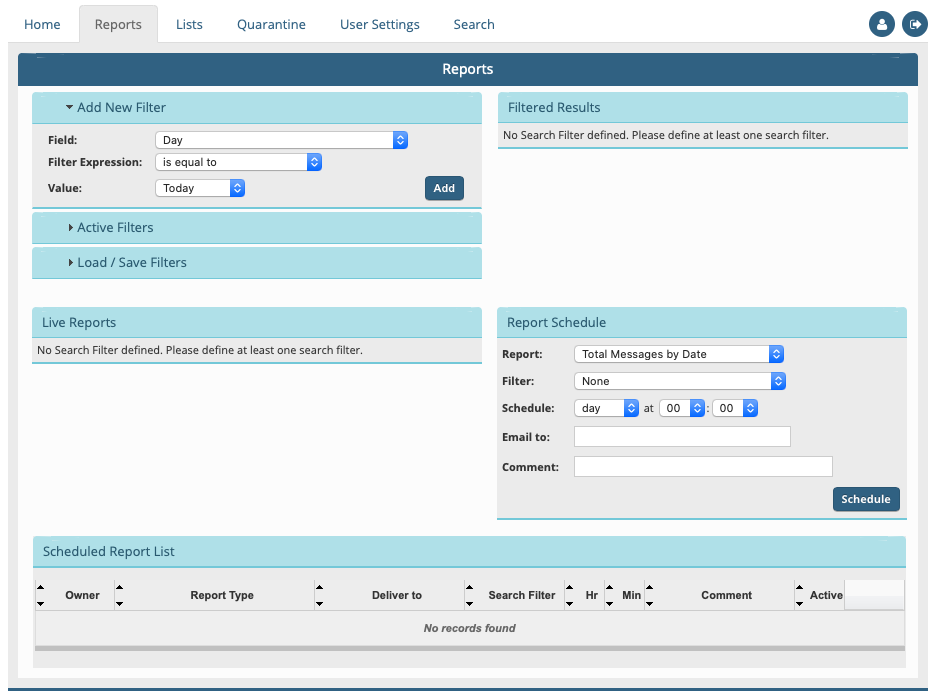
Libraesva ESG offers full reporting capabilities. Accessing the menù Report will open the following screen:
It is important to understand how to setup the filters based on the data with which they operate. This page is divided into sections:
If there are active filters they will appear in this section, otherwise all data present in the database will be elaborated.
Section that allows a filter to be added to the database of which we want a report. For example we can filter the data, the sender, the receiver (or part of), key words in the message description, etc.
The types of selectable filters and comparison parameters are chosen from this list.
Filters can be multiple. All conditions are joined together with the specified logic condition (AND, OR)
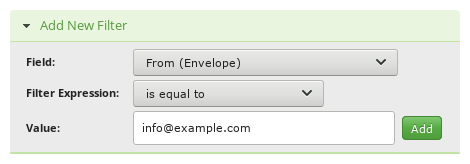
For example: to filter all messages arriving from info@example.com , we will setup:
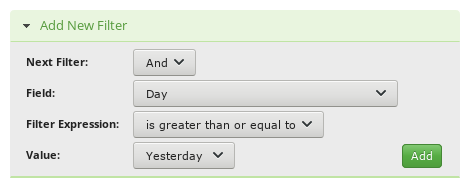
And later limiting ulteriorly the period of time from yesterday:
In this way we will have two active filters on which we can carry out reports:
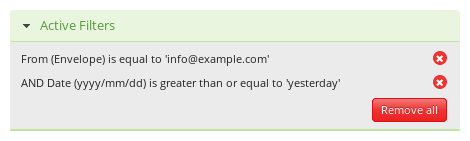
By selecting ‘Remove’ to the right of the active filters, all pre-set filters can be eliminated.
It is possible to save/load custom filters. It is convenient to utilize recurrent filters.
This section summarize message count that matches your filter query. Live reports will be executed against this recordset.
From this section you can list messages matching your query. The Message Operation option allows bulk actions on messages.
Contains the list of possible live reports. All reports will be executed based on data previously filtered. The reports will be graphically generated. Charts can be printed or exported either as images or dataset.
Depending on selected filters some reports may not be available.
×NOTE: on large databases avoid filters with filter operator “contains” or “does not contains” as generated queries are very slow.
From this section it is possible to schedule reports. Scheduled reports will be delivered automatically to the indicated email address in PDF format.
Please note that a filter is mandatory for all reports except the MTA Statistics one that is run on the full database.