Libraesva Email Security Gateway allows companies to enforce their e-mail acceptable use policy, and actively blocks unknown 0-day malware thanks to it’s innovative sandboxing modules.
Libraesva Email Security Gateway protects your business, detecting all types of cyber threats and attacks spread via email
Thanks to 14 levels of in-depth analysis, sandbox protection and machine learning technologies, Libraesva Email Security Gateway provides its customer with 360 degree protection, against targeted Business Email Compromise (BEC) attacks, ransomware, phishing, trojans, next-generation spam and malware.
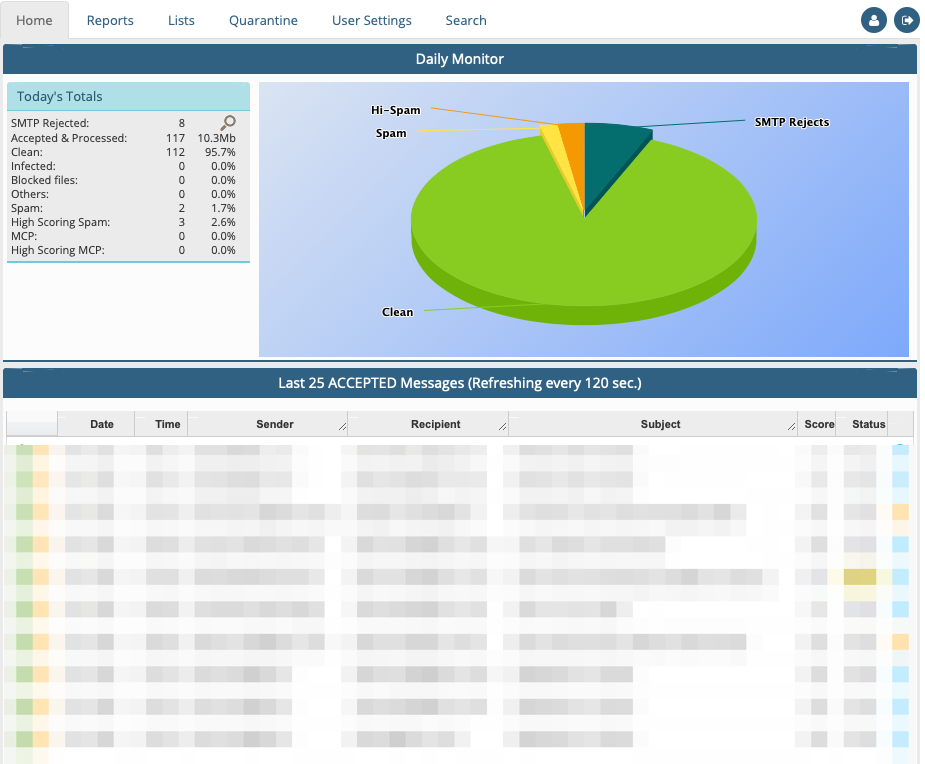
Dashboard First overview and Function Tabs
The dashboard is the main page of Libraesva ESG and gives an overview of the status of the service. All the data shown here are automatically refreshed every 120 seconds (by default).
The Dashboard let the user decide the kind of information to analyze. There are five tabs that the customer can use to insight its needs.
The tabs are :
Home (Dashboard)
Report
Libraesva ESG offers full reporting capabilities
Lists
You can manage Libraesva ESG spam whitelists and blacklist.
The Whitelist and the Blacklist entries shown operate according to the privileges of the connected user.
Quarantine
From this menù you can access quarantined messages, in other words messages categorized as spam or hi-spam, or messages blocked by content filtering rules.
User Settings
Libraesva ESG users can manage and access the system.
With Libraesva ESG you can enable per-user quarantine and the system will create user accounts to enable access to quarantine settings and messages. ESG supports per-user account spam score
settings.
Search (track Mail Tool)
The Track Mail Tool is accessible right from the main menu, and is the fastest way to look for a message in ESG.